
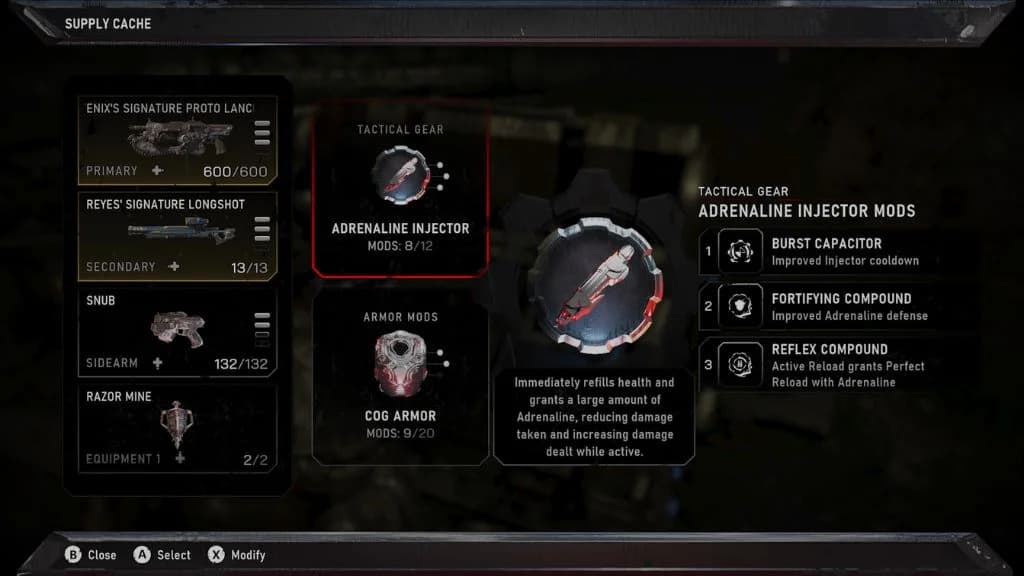
Start with one problem
Pick the encounter you want to improve, then change the part of the loadout closest to that problem. The suggestions below are an editorial testing method; they do not promise a best build or a fixed difficulty result.
- 01 · WEAPON
Where do shots stop working?
Look at the range, reload timing and targets you struggle to finish. Read the unlocked mod descriptions before changing your gun.
- 02 · ARMOR
When do you go down?
Compare what happens while pushing, holding cover or helping a teammate. Choose an unlocked option that addresses that moment.
- 03 · GEAR
What is your recovery plan?
Decide when you will use the selected equipment. Test its timing in a familiar fight instead of saving every activation for an imagined emergency.
Read the three layers together
Rivera combined close-range healing with perfect-reload benefits during his review playthrough. It is one firsthand build example, not an exact mod-name shopping list or proof that the same combination suits every encounter.[2]
Use the weapon directory to compare your gun choices. For class-specific multiplayer equipment, open Horde classes. Use Tactical Gear & Mods for ability and gear-slot comparisons. Compare named triggers in Armor Mods.
Turn exploration into a refit
- FIND
Check the district
Use the Hard Case and secondary-objective guides to plan your current chapter’s optional stops.
- REFIT
Open the loadout
At your next Supply Cache, inspect what your recent rewards changed and choose a single adjustment.
- REPLAY
Try a familiar encounter
Compare aiming, reloads, survival and equipment timing. Keep useful changes and undo the rest.
| Need | Open |
|---|---|
| Upgrade containers | Hard Case checklists |
| Optional tasks | Secondary-objective routes |
| Refit stations | Supply Cache locations |
Save a small build experiment
This browser checklist records your preparation, not game unlocks. Note the actual mod names in your own screenshot so you can restore the setup later.
Your checks are saved in this browser. This checklist does not sync with the game.
| Done | Step | What to do |
|---|---|---|
| Capture | Save the current weapon, armor and gear menu. | |
| Choose | Name one recurring problem and one unlocked modification to test. | |
| Compare | Replay a familiar encounter with the same difficulty and squad conditions. | |
| Evaluate | Check both what improved and what became harder. | |
| Keep | Save the preferred setup before trying the next change. |