
Minimum, recommended and Ultra hardware
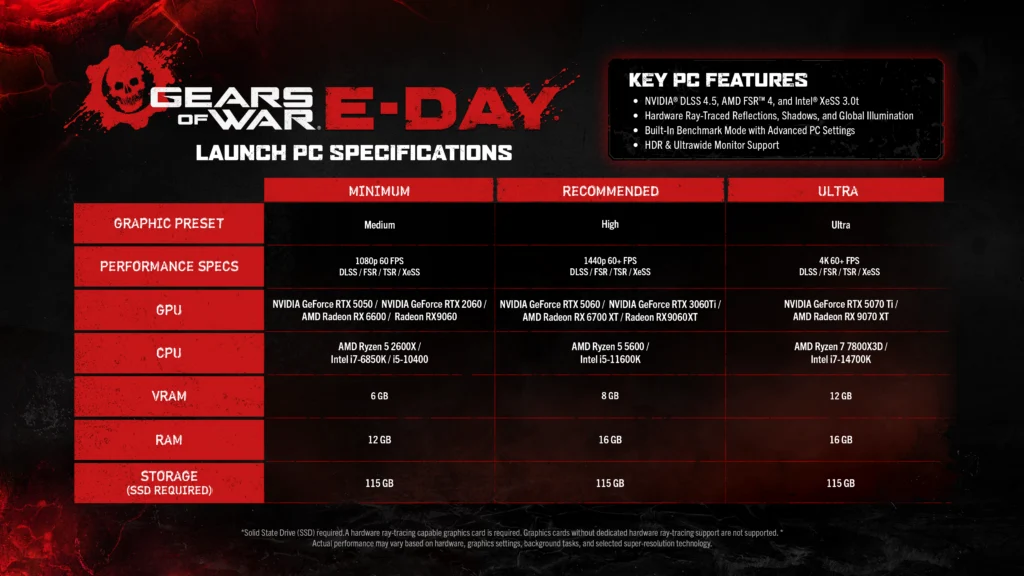
| Component | Minimum | Recommended | Ultra |
|---|---|---|---|
| Preset / target | Medium · 1080p / 60FPS | High · 1440p / 60+FPS | Ultra · 4K / 60+FPS |
| NVIDIA GPU | RTX 5050 / RTX 2060 | RTX 5060 / RTX 3060 Ti | RTX 5070 Ti |
| AMD GPU | RX 6600 / RX 9060 | RX 6700 XT / RX 9060 XT | RX 7900 XT |
| AMD CPU | Ryzen 5 2600X | Ryzen 5 5600 | Ryzen 7 7800X3D |
| Intel CPU | Core i7-6850K / i5-10400 | Core i5-11600K | Core i7-14700K |
| VRAM | 6GB | 8GB | 12GB |
| RAM | 12GB | 16GB | 16GB |
| SSD space | 115GB | 115GB | 115GB |
These are developer targets using upscaling, rather than native-resolution benchmark results. Hardware, graphics settings, background tasks and the selected upscaler can change actual performance. GPUs without dedicated hardware ray-tracing support are unsupported.[1]
Steam lists 64-bit Windows 10 22H build 19045.7291 at minimum and Windows 11 25H2 or newer as recommended, DirectX 12 and broadband internet. Updates may need additional free space beyond the 115GB installation requirement.[2]
PC graphics and display options
| Area | Options |
|---|---|
| Upscaling | DLSS 4.5, FSR 4, XeSS 3.0; Unreal Engine TSR is also named by Xbox |
| Rendering | Hardware ray-traced reflections, shadows and global illumination; HDR |
| Displays | 21:9 / 32:9 gameplay and menus; borderless, exclusive fullscreen or windowed |
| Frame-rate limit | 30, 60, 90, 120, 144, 240 or Unlimited |
| Controls | Keyboard / mouse and controller remapping |
| NVIDIA features | Reflex, optional frame generation and RTX Mega Geometry on compatible hardware |
NVIDIA released Game Ready driver 617.14 with E-Day support on September 22. Use the vendor's current driver download for your GPU. The August beta's 610.74 NVIDIA floor and 150FPS cap describe the test build.[5][6]
Run the built-in benchmark after changing settings. Its launch performance overlay excludes generated frames, so the displayed FPS can be lower than the final frame output when frame generation is enabled.[1][4]
For measured Low Core Mode comparisons, an RTX 3060 starting profile and a repeatable tuning checklist, open PC Performance & Settings.
Steam Deck, Xbox Ally and shader delivery
Does E-Day support Steam Deck and Xbox Ally?
The Steam product description names Steam Deck, Xbox Ally X and Xbox Ally as handheld optimization targets. It does not provide a device-specific resolution, FPS or battery-life guarantee.[2]
Microsoft's October 1 update lists Advanced Shader Delivery (ASD) for Windows 11 24H2 or later: AMD RDNA 1/2/3/3.5/4 with Adrenalin 26.6.1+, or Qualcomm Snapdragon X2 with driver 2026.08.3+. These are shader-delivery requirements, not the game's minimum specifications.[7]
Intel Arc B570/B580, Core Ultra Series 2/3, all NVIDIA RTX GPUs and RTX Spark are planned for later in October. Install the Xbox PC app before downloading E-Day; the launch-window message "Precompiled shaders installed" confirms ASD is working.[7]
For account links and saves across devices, see Crossplay & Saves. For launch crashes, offline restrictions and support, see Launch Troubleshooting.[2][4]
Sources & further reading
- E-Day final PC specifications and September 29 pre-installXbox Wire / The Coalition · September 17, 2026; specifications image updated September 28
- E-Day Steam listing: PC requirements, features & cross-platform playXbox Game Studios / Steam
- The Coalition and NVIDIA: E-Day PC rendering featuresXbox Wire · July 14, 2026
- Emergence Begins: Season 1, launch changes and known issuesThe Coalition · September 30, 2026
- GeForce Game Ready 617.14: E-Day, DLSS and RTX Mega GeometryNVIDIA · September 22, 2026
- E-Day Open Beta: access, FAQ & August 12 updateThe Coalition · August 12, 2026
- E-Day Advanced Shader Delivery: supported hardware and October rolloutMicrosoft DirectX Developer Blog · October 1, 2026